Home | JCBid |Software Development | Domain Registration | Hosting | Web Designing | Buy Books | Advertise with JCSearch | Whois | IP Locator |
Add Search | Shopping | Store | Free Blogs | Free GuestBook | Free E-Cards | Free Games | Free Tutorials | Set as Home | Add to Favorite | Suggest a Site | Directory Our Portfolio | Terms of service | Free quote | Tell a Friend | Special Offer | Job Opportunities | games | Usenet Groups

 
Updated Blogs
How to get top one position for website
Kraftwerk K9 Is Committed To Providing The Dogs With A Carin
How To Project Your Voice With Song
Chronic Cough Facts
More .....


Jasmine Computers Inc.
JCBid Auction

9 & 4 QUART PRSSRE COOKER 9 EL Precise Heat 12-Element Low Pressure, Pressure Cooker
Seller: dcshop

20"" FIRE RESCUE DUFFLE BAG Embassy Black Hand-Sewn Pebble Grain Genuine Leather 20"" Fire Rescue Duffle Bag
Seller: in2009


JasmineCorp Directory
 Check Domain Name:
.  
note that you are authorized to use JCTamil font  only for reading purpose of Sites hosted by http://jasminecorp.net Bible.  This font is a copyrighted material of Jasmine Computers

Instruction to install downloaded font:

1.  Click here to Download the file (JCTamil.ttf) in a new folder.  
2.  Click on Start Menu - Settings - Control Panel.
3.  Double Click on fonts (marked with red color)
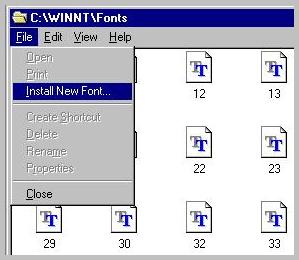
4. Click on - File - Install New Font.
4.  Select the directory in which you unzipped the downloaded file.
5.  Select 'JCTamil' Font from font list and click on OK.
6. That's it you are done!!! Now you will be able to read in Tamil.


Click here to subscribe for Jasminecorp's product News.

Copyright© 1998 by Jasmine Computers Inc.