Home | JCBid |Software Development | Domain Registration | Hosting | Web Designing | Buy Books | Advertise with JCSearch | Whois | IP Locator |
Add Search | Shopping | Store | Free Blogs | Free GuestBook | Free E-Cards | Free Games | Free Tutorials | Set as Home | Add to Favorite | Suggest a Site | Directory Our Portfolio | Terms of service | Free quote | Tell a Friend | Special Offer | Job Opportunities | games | Usenet Groups

 
JCBid Auction

PROVOCATIVE INTERLUDE by Elizabeth Arden SET-EAU DE PARFUM SPRAY 1.7 OZ & BODY LOTION 3.3 OZ
Seller: csupply

62 Torchier/Onyx/2.25Fttr Meyda Item# 10287
Seller: amazing-products
Jasmine Computers Inc.
JCBid Auction

Steamer & Rice Cooker BIGGEST LOSER AS1500BL Steamer & Rice Cooker
Seller: jkelectronics

BJJ Jaguars Giant 8-Foot X 2-Foot Nylon Banner The Party Animal Item# BJJ
Seller: elect55


JasmineCorp Directory
 Check Domain Name:
.  

Please note that you are authorized to use JC_Hindi font  only for reading purpose of Hindi Bible.  This font is a copyrighted material of Jasmine Computers

Instruction to download and install downloaded font:

How to save font:

1. 

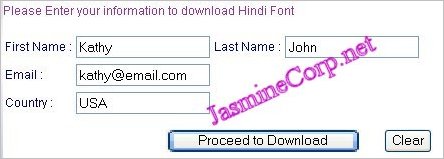
Enter your information in given box and click on "Proceed to Download".

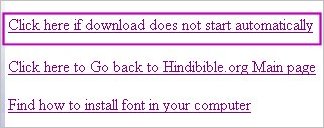
Click on Download link as shown in below picture.


2. 

You can save your file in any directory. Here it was saved in C: directory.
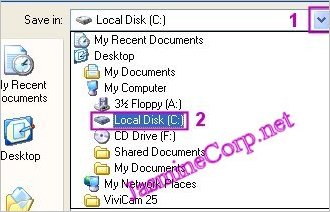
To look directory C: - look at number 1.
If it shows "Local Disc (C:) then you can proceed rightaway. If it shows something else you need to find c directory to save your file.

- To find c: click on the arrow shown in number 1.

- Then select C: directory as shown in number 2.
- Now look again, number 1 box should show directory C:

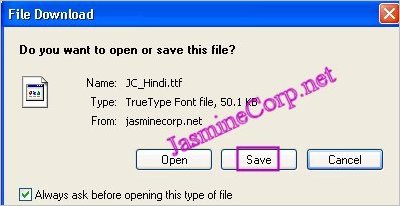
Now click on "Save". Your file was saved in directory C:


How to install font:
1.

Click on "Start" menu lower left menu with your right mouse button. Click on "Explore".


.3.

Now a page will open up. Click on C:


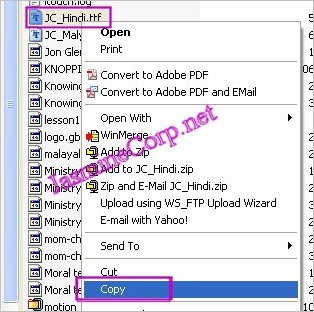
- Now look on right side box for font "JC_Hindi.ttf"


- Now first click with left mouse button on "JC_Hindi.ttf" and now click with right mouse button and click on "Copy" to copy it.


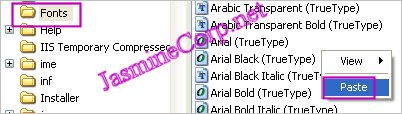
- Now in explore again look at left side box for directory C: now scroll down to look for "windows" folder and click on it. If you can't find "Windows" after scroll down click on C: directory and find it on right side box. Now double click on it and find "Fonts" folder.


-Double click on "Fonts" folder to open it. Now on right side of the box click with right mouse button and click on "Paste".


- Now when you look in the folder "Fonts" you will find your font "JC_Hindi.ttf". It means the font is installed.


That's it now you can read in Hindi.

If you have any difficulty installing font please send us an email.


Click here to subscribe for Jasminecorp's product News.

Copyright© 1998 by Jasmine Computers Inc.