Home | JCBid |Software Development | Domain Registration | Hosting | Web Designing | Buy Books | Advertise with JCSearch | Whois | IP Locator |
Add Search | Shopping | Store | Free Blogs | Free GuestBook | Free E-Cards | Free Games | Free Tutorials | Set as Home | Add to Favorite | Suggest a Site | Directory Our Portfolio | Terms of service | Free quote | Tell a Friend | Special Offer | Job Opportunities | games | Usenet Groups

 
Updated Blogs
Desktop Remote Support using LiveMeeting.
Time Saving Technology for Computer Support.
Bladder Retention Treatment
Basic Credit Card Safety Tips
More .....


Jasmine Computers Inc.
JCBid Auction

Lexar Media Model# EX16GB-431 16GB ExpressCard
Seller: dcshop

BROWN JACQUARD PATCHWORK PURSE Gigi Chantal Brown Jacquard Patchwork Purse
Seller: elect55


JasmineCorp Directory
 Check Domain Name:
.  
note that you are authorized to use JC_Malayalam font  only for reading purpose of Sites hosted by http://jasminecorp.net Bible.  This font is a copyrighted material of Jasmine Computers Inc.

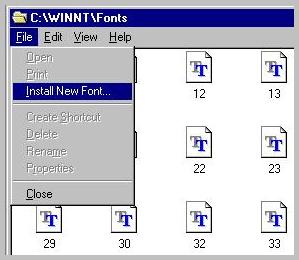
Instruction to install downloaded font:

1.  Click here to Download the file (JC_Malaya.ttf) in a new folder.  
2.  Click on Start Menu - Settings - Control Panel.
3.  Double Click on fonts (marked with red color)
4. Click on - File - Install New Font.
4.  Select the directory in which you unzipped the downloaded file.
5.  Select 'JC_Malayalam' Font from font list and click on OK.
6. That's it you are done!!! Now you will be able to read in Malayalam.


Click here to subscribe for Jasminecorp's product News.

Copyright© 1998 by Jasmine Computers Inc.